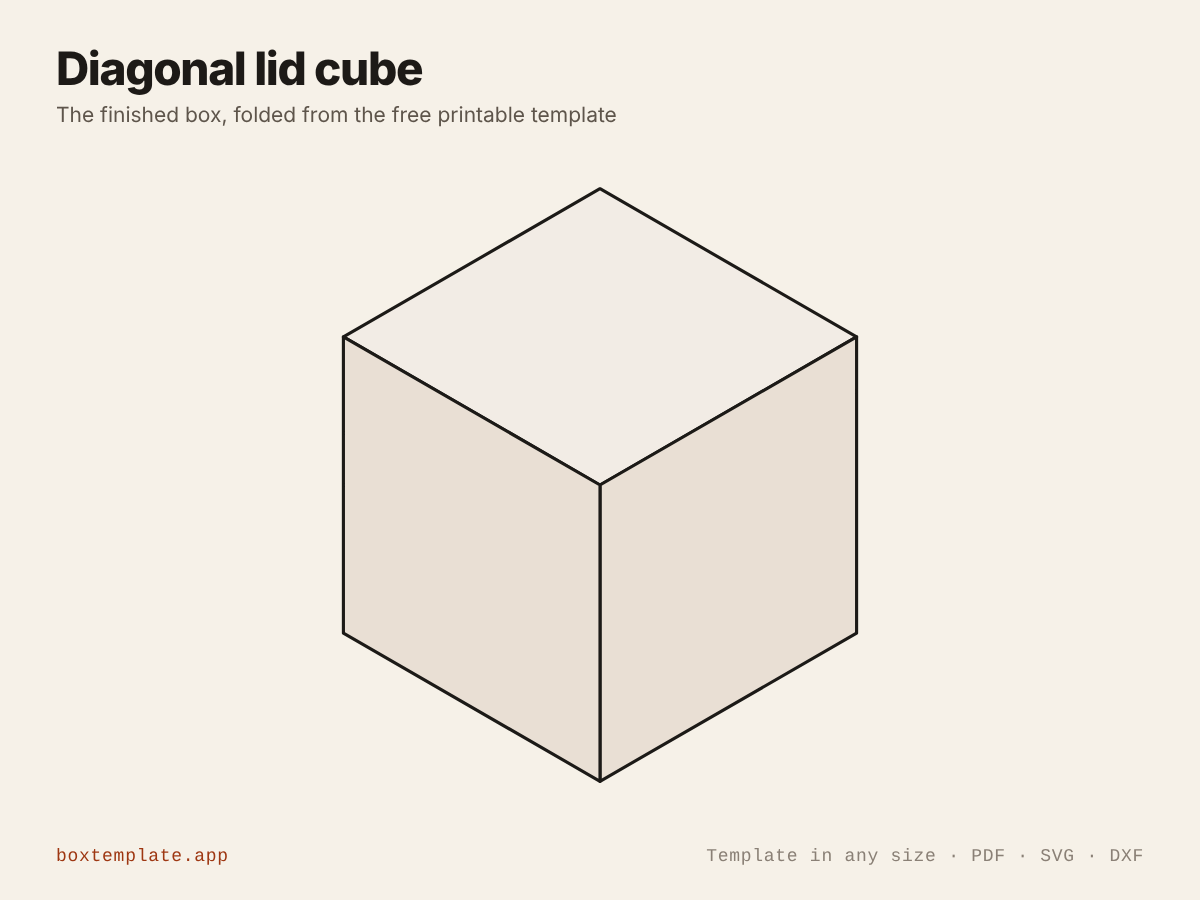
The diagonal lid cube template, flat and folded
What this template is for
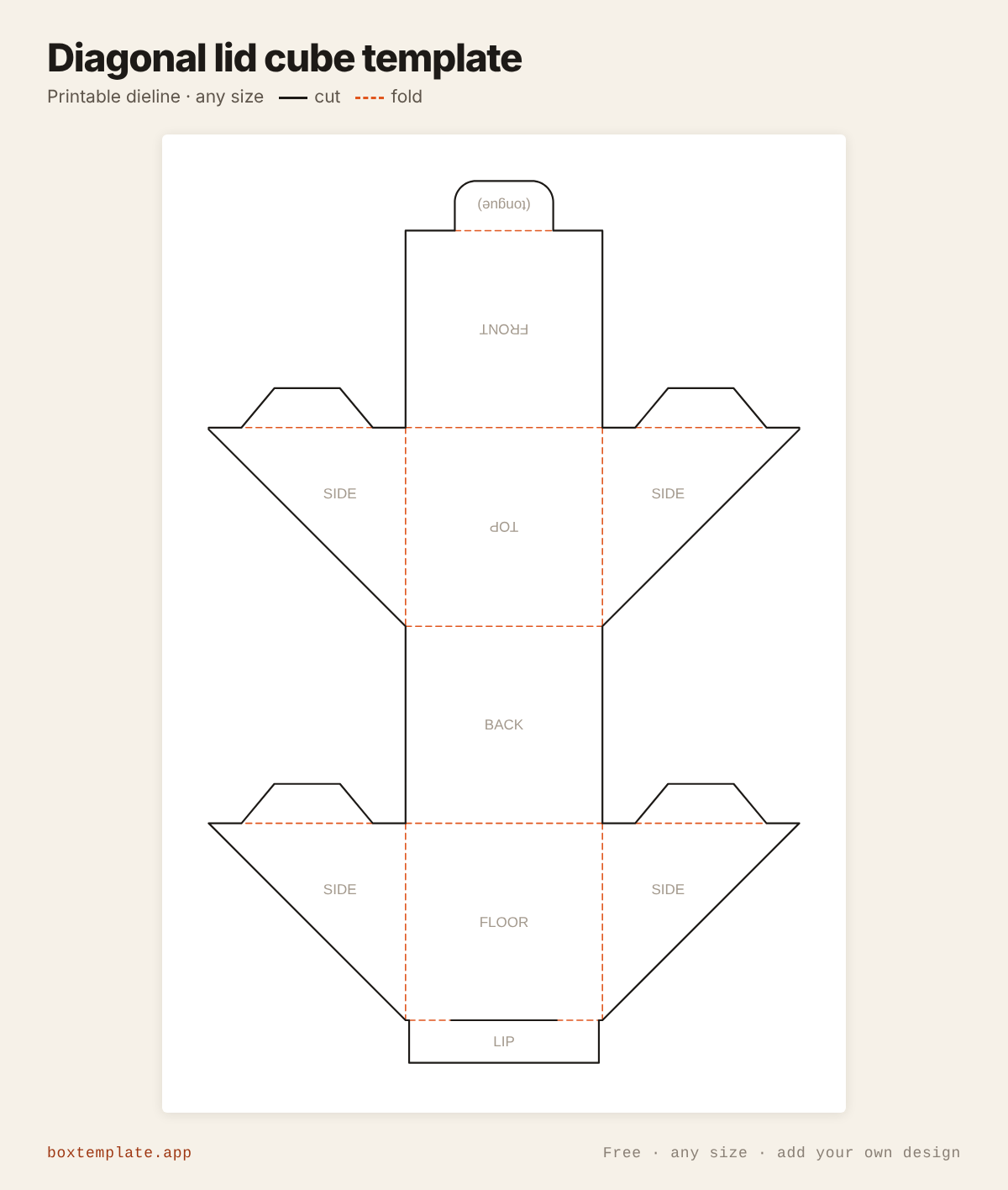
One piece: a cube whose lid takes the top, the front and half of each side, split corner to corner, and swings up and back. A tongue locks it into a slit at the front. Gifts, mugs, candles and keepsakes.
Also called diagonal lid box · diagonal opening box · slant lid cube box · diagonal cube box — all the same shape, and this is it.
- Gift and keepsake boxes
- Mug and candle boxes
- Party favours and surprises
- Product packaging with a reveal
How to use this template
All four downloads are the same diagonal lid cube at the same size — only the format changes.
Which file goes where: PDF, PNG, SVG or DXF
- PDF printing at home
- Print at 100 per cent, or hand it to a print shop as "actual size, no scaling".
- PNG 300 dpi Canva, Photoshop, Procreate
- Upload, lock it in place and design your diagonal lid cube on top. Free plan and phone included. Full Canva walkthrough →
- SVG Cricut, Illustrator, Inkscape, Affinity
- Vector, with cuts, folds and labels on separate layers. Cricut and Silhouette walkthrough →
- DXF Silhouette, laser and vinyl cutters
- Two layers, CUT and FOLD — and the one free Silhouette Studio Basic will open.
Getting it printed properly → · Putting your own design on it →
Printing it
- Type your size above, then download the PDF.
- Print at 100% — never “fit to page”, or every measurement comes out wrong.
- Too big for the paper? Pick your paper size and leave Fit the pieces to the page ticked: each piece gets its own place on a sheet and the PDF comes out with every page in it, nothing cut in half and nothing to tape.
How to put it together
These pictures are the diagonal lid cube itself, not a generic diagram — change the measurements above and the template changes, but the steps never do. The names in capitals are the labels printed on the template.
-
Cut the solid lines
Every solid line is a cut. Do the inside shapes first, while the sheet is still whole and easy to hold.
-
Score every dashed line
Dashed lines are folds. Score each one first — an empty ballpoint against a ruler — or the card cracks along the outside of the bend.
-
Step by step
- Cut the box out in one piece and score every dashed line.
- Fold the FLOOR’s two half SIDEs up and glue their tabs inside the BACK.
- Fold the TOP’s two half SIDEs down and glue their tabs inside the FRONT.
- Stand the LIP up at the front of the floor.
- Close the lid and push the (tongue) through the slit along the foot of the lip.
Glue: a glue stick for paper, white PVA on card — hold each seam thirty seconds, and let it dry before you use it.
Questions about the diagonal lid cube
How does it open?
Each side is split corner to corner. The lid is the top, the front and the upper-front half of each side, hinged along the top of the back, so it swings up and back in one piece.
How does it stay shut?
A 14 mm tongue on the foot of the front goes through a slit along the bottom of the 12 mm front lip. Pull the front out a little to open it.
What size is the default box?
A 55 mm cube. It prints as one piece of 167 × 249 mm, on one A4 or US Letter sheet.
Templates like this one
See all 174 templates · For Canva · For Cricut · For Etsy sellers · Getting it printed
Collections: Wedding and party favour box templates · Christmas box templates · Food box templates · Diwali mithai box templates