Sleeve Template Maker
A band that slides over a box. Give it the size of the box it has to wrap around — the thickness allowance is added for you.
Sleeve — change shape
Put a logo, photo or pattern straight onto the box — most free template sites give you the outline and stop there. Drag it where you want it; it is trimmed to the cut lines so nothing prints off the card, and it stays in your browser.
Advanced settingsunits, flaps, board, paper, lines
Bigger than the paper? Each piece prints whole on its own sheet. A single piece is never split: pick bigger paper or a smaller size. More about printing
This shape has no 3D view yet. The template is still exact.
This shape's 3D view is only an approximation of the printed sheet, so it shows plain card. Your pictures still print exactly where you placed them on the template.
Drag to turn and tilt it; ctrl + scroll or the + and − buttons zoom.Swipe sideways to turn it. Two fingers tilt and pinch to zoom; full screen lets one finger do everything. Double-tap to reset. The fold starts from the very template you print, so gaps and loose tabs show.
Drop a picture anywhere on the drawingTap “Add a picture” below to print your own design on this box.
Print at 100% (“actual size”), never “fit to page”, or the box comes out the wrong size.
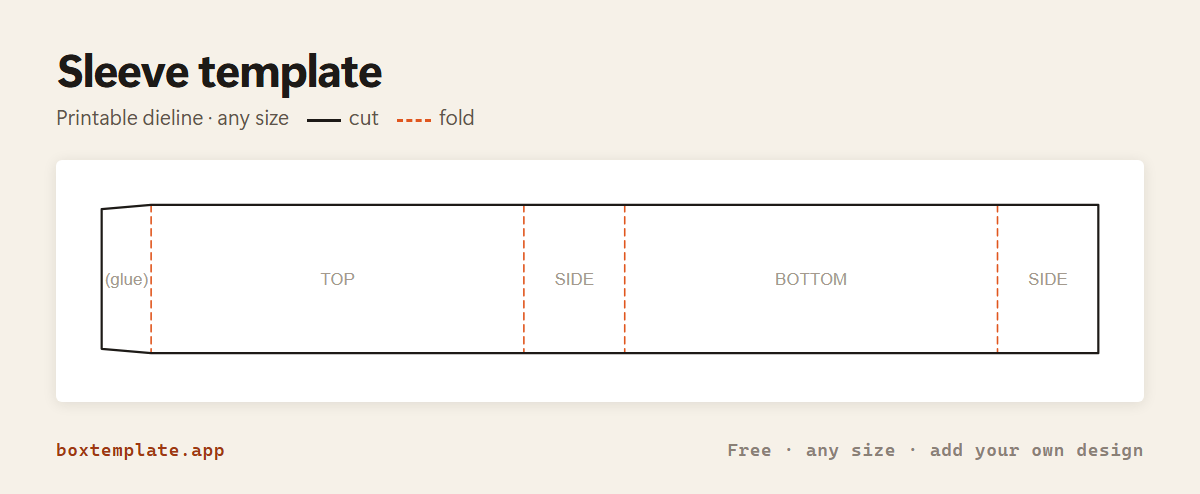
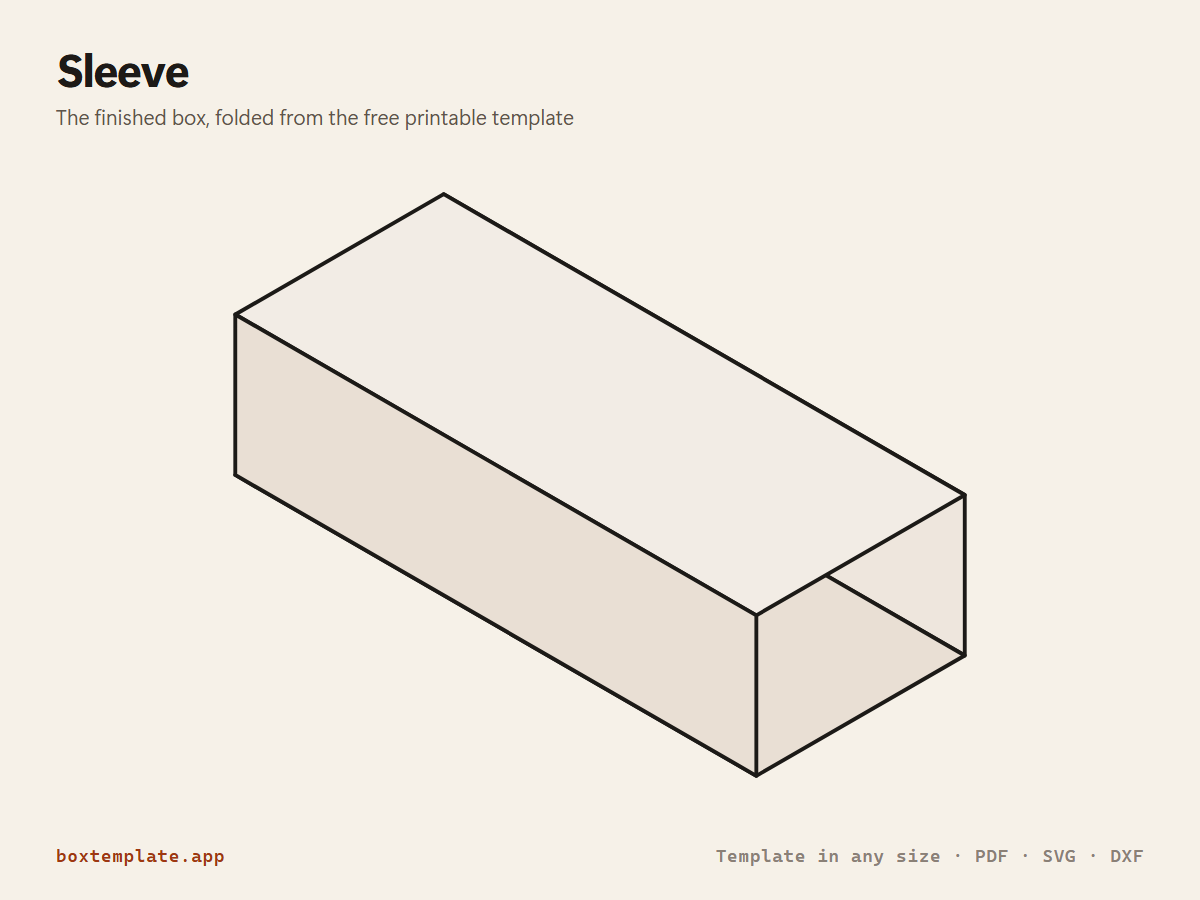
The sleeve template, flat and folded
What this template is for
A band that slides over a box. Give it the size of the box it has to wrap around — the thickness allowance is added for you.
Also called belly band · box wrap · card sleeve · outer sleeve · chocolate bar wrapper · candy bar wrapper
What size sleeve do I need?
The same sleeve does a different job at each size. These are starting sizes for the things people make it for most. Tap one to open the template at that size, then measure your own and change any number to fit.
| Use | Size (Length × Box height × Sleeve width) | Holds |
|---|---|---|
| Soap sleeve | 62 × 27 × 70 mm | A soap bar, 90 × 60 × 25 mm, ends showing |
| Chocolate bar wrapper | 80 × 10 × 120 mm | A 100 g chocolate bar |
| Gift box belly band | 150 × 40 × 60 mm | A band round a 150 × 40 mm box |
The sleeve at a glance
| Standard size | Length × Box height × Sleeve width: 150 × 40 × 60 mm (5.9 × 1.6 × 2.4 in) |
|---|---|
| Flat sheet at that size | 403 × 60 mm (15.9 × 2.4 in) |
| Prints on | A4: one sheet · US Letter: one sheet · A3: one sheet |
| Biggest on one sheet of A4 | 196 × 52 × 78 mm (7.7 × 2 × 3.1 in) |
| Biggest on one sheet of US Letter | 182 × 48 × 73 mm (7.2 × 1.9 × 2.9 in) |
| Glue | Yes |
| Drawn for | Heavy cardstock, 350–450 gsm / cereal-box card (0.5 mm) |
Making a sleeve that fits the first time
Measure the box, not the sleeve
Type the outside size of the box the sleeve goes round: its length and its height, and how wide you want the band itself to be. The tool adds the extra the card needs to wrap round itself, from the thickness you give it, so the inside of the band matches the box exactly. For an easier slide, add a millimetre to the length and height.
For the snuggest fit, wrap the printed band round the real box and glue the flap while it is there. A band glued flat first and slid on afterwards is always a fraction looser.
How wide to make the band
- A belly band that holds a lid shut: a third to a half of the box's depth, the side the band runs across.
- A label band on a soap or candle box: just wider than the printed label or logo.
- A full sleeve, like a matchbox outer: the whole depth of the box, open at both ends.
A window in the front
Set a window border and the front face gets an opening, leaving a frame of that width. Cut the window before you fold anything, and tape acetate or cellophane behind it on the inside: the frame is narrow, and it tears much more easily once the band has been creased.
Packaging sleeves for products
Sleeves are the cheapest way to brand plain stock boxes: buy plain white or kraft boxes, print only the sleeve, and one design covers every product of that size. Print the PDF on 250–300 gsm card, or download the SVG or PNG and design it in Canva or Illustrator with the outline locked in place.
Mistakes to avoid
- Measuring the inside of the box. The sleeve goes round the outside.
- Using very thick board for a tight band: it cracks at the four corners. Score every fold first, or drop to thinner card.
- Leaving the thickness at its default when your card is thicker, or setting it to zero. At zero the band is cut to the exact size of the box, and the card's own thickness then makes it too tight.
Printing it
At its standard size the sleeve prints on one sheet of A4 or US Letter. Whatever the size, print at 100% (“actual size”), never “fit to page”. Printing it right · Cricut and Silhouette · Designing it in Canva · Your own picture on it
How to put it together
Drawn from the sleeve template itself; words in capitals are printed on it.
-
Cut the solid lines
Solid lines are cuts: inside shapes first.
-
Score every dashed line
Dashed lines are folds: score them first so the card does not crack.
-
Step by step
- Cut the outline. If you set a window border, cut the opening in the face now and tape acetate behind it.
- Crease the four folds between TOP, SIDE, BOTTOM and SIDE.
- Wrap the band round the box it is for.
- Glue the (glue) flap under the far end while the band is on the box, so the fit is exact.
Glue: glue stick on paper, PVA on card.
Tip for this one: Wrap it round the box itself and glue the flap while it is in place, so the fit is exact. If you set a window border, cut the opening out before you fold anything, and tape a piece of acetate or cellophane over it on the inside — the frame is thin, and it tears far more easily once the box has been creased.
Questions about the sleeve
What size do I enter?
The size of the box the sleeve has to go around. The wrap allowance for the board thickness is added for you, so the sleeve is not too tight.
How do I get a snug fit?
Wrap the sleeve around the actual box and glue the flap while it is in position. Paper stretches less than you would think, so glue in place beats measuring.
Can I use it as a napkin ring?
Yes — set a small box height and a narrow sleeve width and you have a ring.
Can I design the sleeve in Canva?
Yes. Download the PNG at 300 dpi, make a Canva design the same size as your paper, drop the PNG in at full size and design on top of it. The Canva guide on this site walks through it step by step.
Can a Cricut cut the sleeve?
Yes. Download the SVG for Cricut Design Space or the DXF for Silhouette Studio, and set the fold line to score. A sleeve is a single strip, so it is one of the easiest shapes to fit on a 12 by 12 inch mat.
What size sleeve do I need for soap sleeve, chocolate bar wrapper or gift box belly band?
Soap sleeve: 62 × 27 × 70 mm; Chocolate bar wrapper: 80 × 10 × 120 mm; Gift box belly band: 150 × 40 × 60 mm. These are starting sizes; measure what goes inside and add a few millimetres of room.
Templates like this one

Guides: How to make 50 or 100 identical boxes without losing a weekend
See all 174 templates · For Canva · For Cricut · For Etsy sellers · Getting it printed
Collections: Wedding and party favour box templates · Christmas box templates · Food box templates · Diwali mithai box templates